歡迎訪問徐州銘昇電子科技有限公司官方網站!
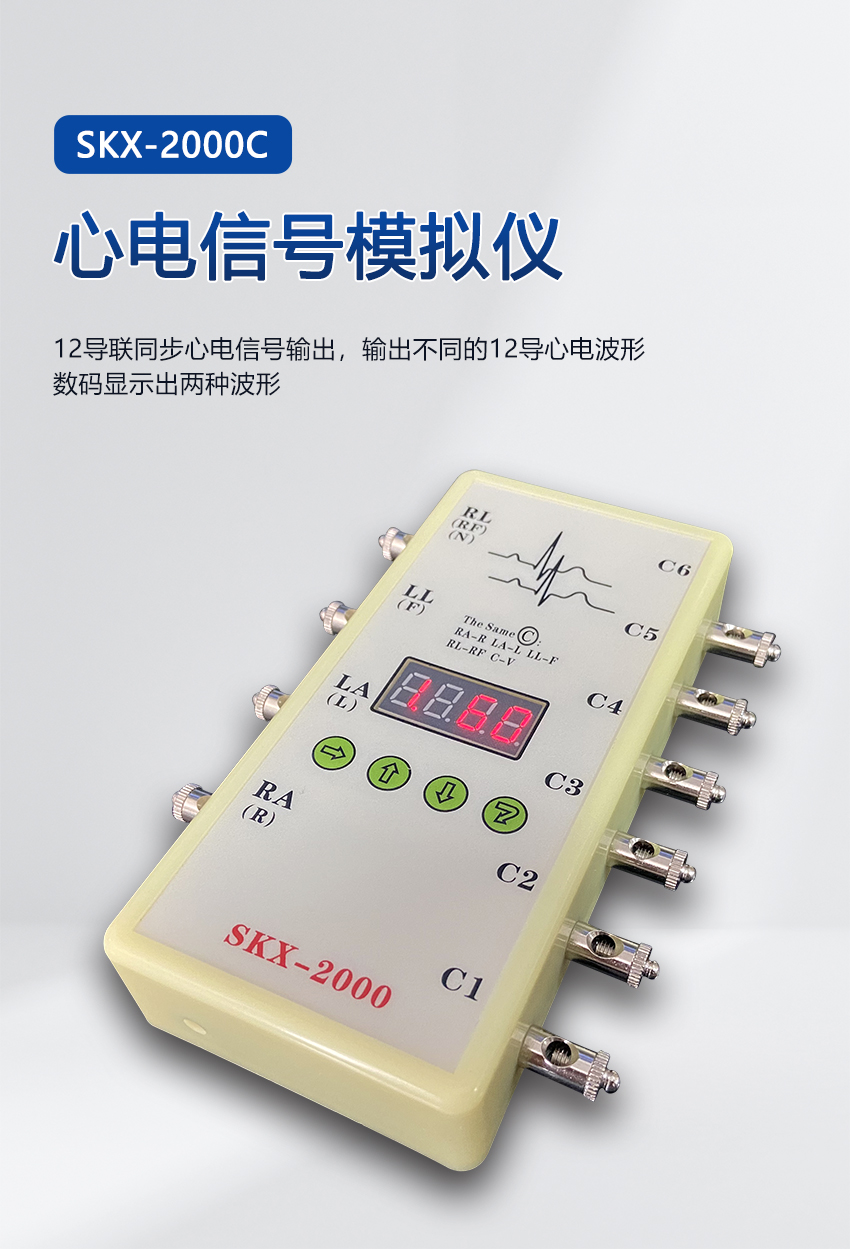
SKX-2000C 心電信號模擬儀中文介紹 SKX-2000C ECG Simulator English Introduction
功能特點: Functional Features:
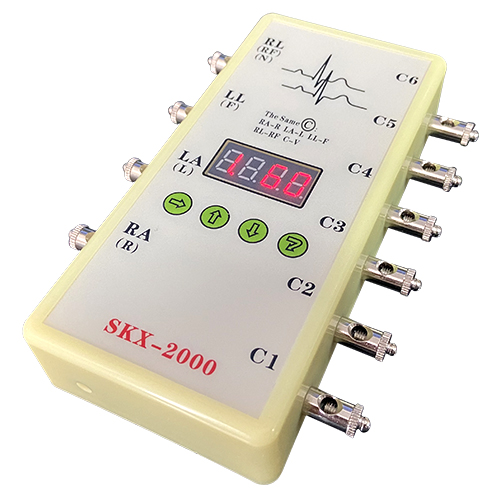
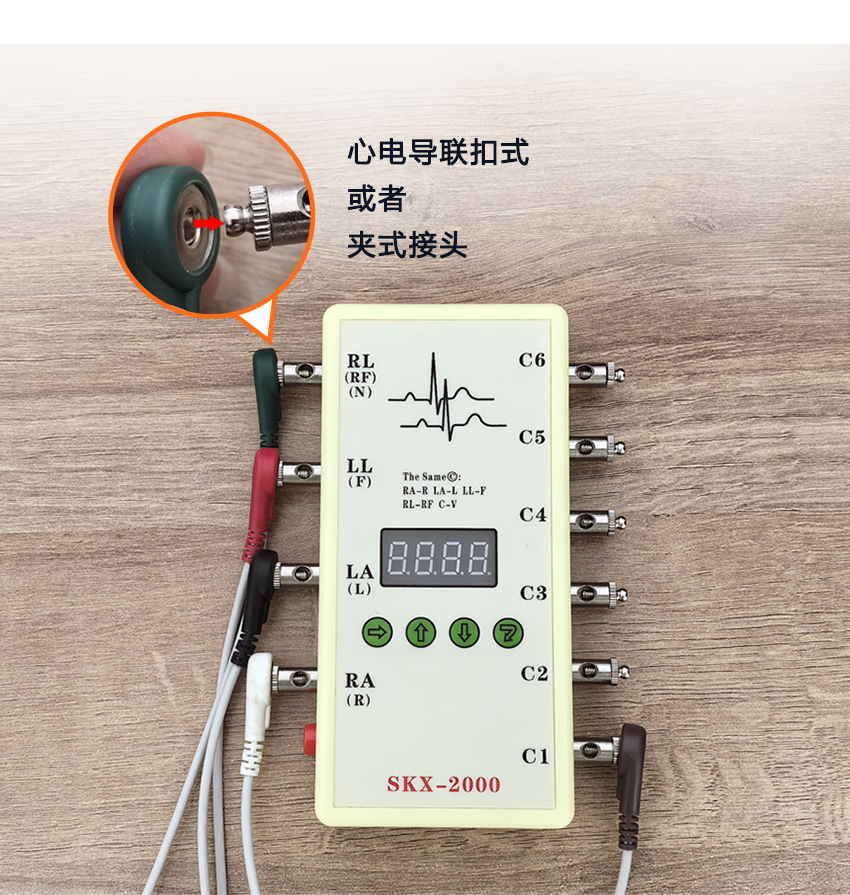
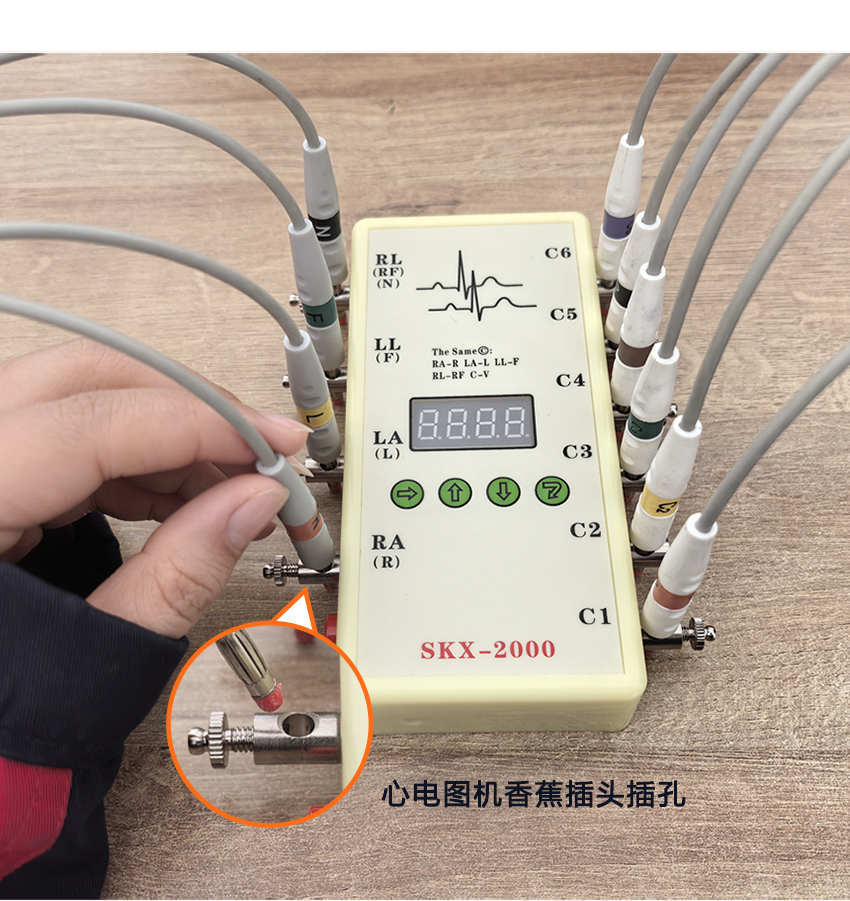
★ 10個萬用連接頭,可以連接任意心電類產品。 ★ Ten universal connectors, capable of connecting any electrocardiogram-related products.
★ 12導聯同步心電信號輸出,輸出不同的12導心電波形。 ★ 12-lead synchronous electrocardiogram signal output, providing different 12-lead electrocardiogram waveforms.
★ 內置高性能CPU,可以模擬輸出標準心率 ★ It is equipped with a high-performance CPU, which can simulate and output the standard electrocardiogram
為60bpm的心電波形。 waveform with a heart rate of 60 beats per minute.
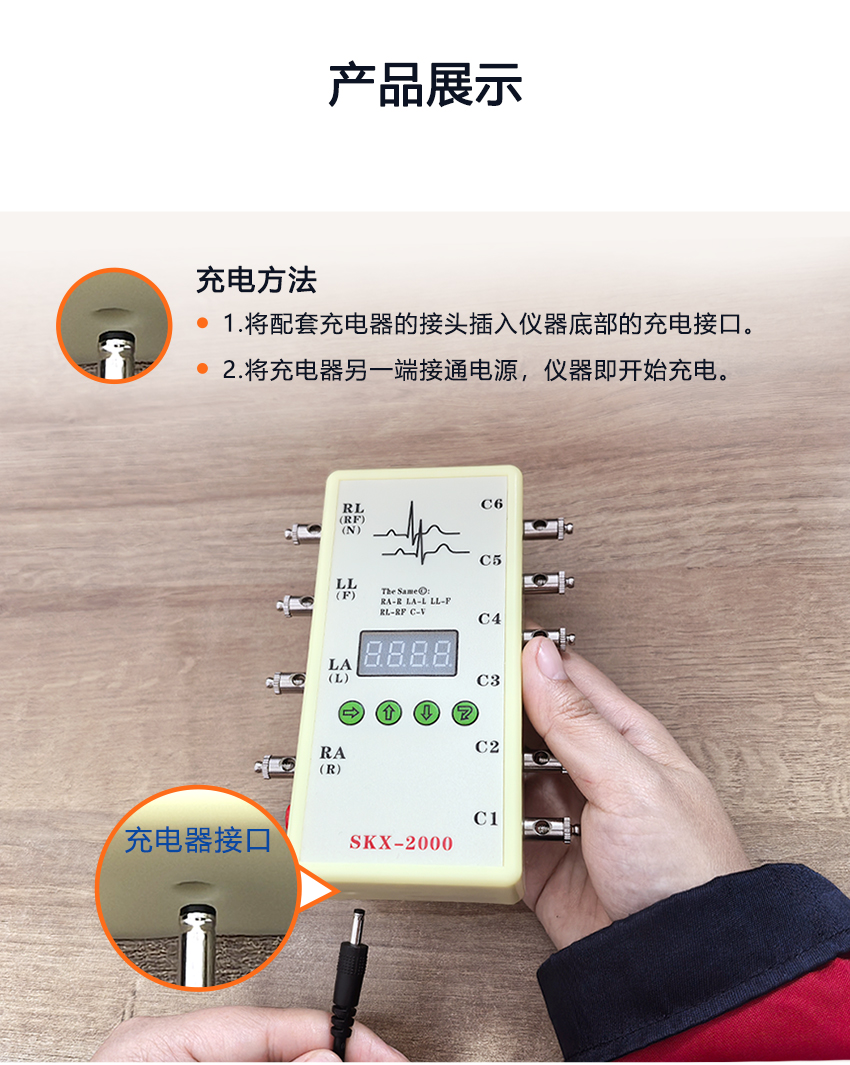
★ 內置大容量鋰電池,外置專用充電器。 ★ Built-in large-capacity lithium battery, with a dedicated external charger.
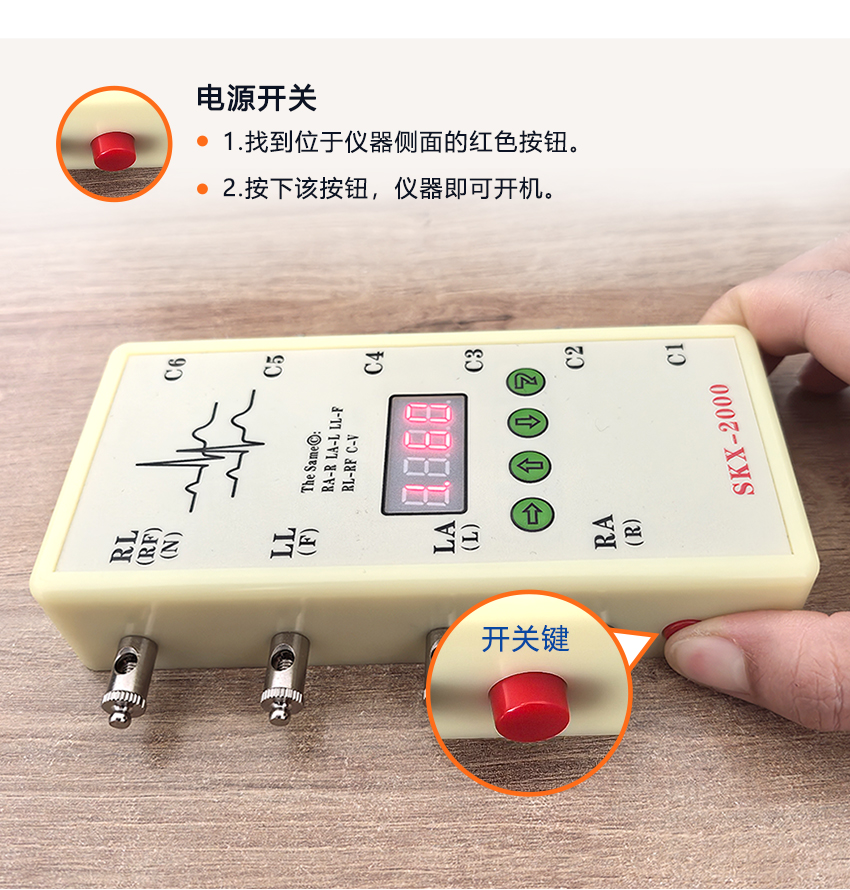
★ 系統具有自動休眠功能,電池過沖、過放保護功能。 ★ The system has the functions of automatic sleep mode and protection against battery overcharging and
overdischarging.
★ 數碼管顯示波形代碼,及頻率、幅度等參數內容。 ★ The digital tube displays the waveform code, as well as parameters such as frequency and amplitude.
★ 按鍵操作,更改波形種類、波形頻率、幅度等參數。 ★ Press the buttons to change parameters such as waveform type, waveform frequency, and amplitude.
本模擬器可以產生如下波形, This simulator can generate the following waveforms.
第一位代碼代表如下波形 The first digit of the code represents the following waveform.
1. 采集人體正常的心電波形 1. Collect normal electrocardiogram waveforms of the human body.
2. 標準心率波形(尖角波),用于檢測心率范圍 2. Standard heart rate waveform (sharp-angled wave), used for detecting the heart rate range
8. 設置波形幅度參數 8. Set waveform amplitude parameters
波形參數介紹: Waveform Parameter Introduction:
1. 正常心電波形 1. Normal electrocardiogram waveform
★ 心率設置范圍:10bpm-200bpm ★ Heart rate setting range: 10 bpm - 200 bpm
★ 信號幅度固定 ★ The signal amplitude is fixed
2. 正負三角波形 2. Positive and negative triangular waveforms
★ 頻率范圍:10bpm-400bpm;(初始數值:75 bpm) ★ Frequency range: 10 bpm - 400 bpm; (Initial value: 75 bpm)
★ 幅度范圍:0.1mV-4mV(10:0.1mV ,400:4mV) ★ Amplitude range: 0.1mV - 4mV (10: 0.1mV, 400: 4mV)
★ 2種模式,模式一:正向波形,模式二:負向波形 ★ Two modes: Mode One: Positive waveform, Mode Two: Negative waveform
通過組合鍵進行選擇 selected by using the combination keys
8. 信號幅度設置 8. Signal amplitude setting
★ 幅度范圍:0.1mV-4mV(10:0.1mV ,400:4mV) ★ Amplitude range: 0.1mV - 4mV (10: 0.1mV, 400: 4mV)
★ 請注意,此幅度設置將影響到除正常心電波形外的所有波形 ★ Please note that this amplitude setting will affect all waveforms except the normal electrocardiogram waveform
波形參數介紹: Waveform Parameter Introduction:
① 本模擬器上電后自動產生波形1的正常心電波形 ① After powering on this simulator, it automatically generates the normal electrocardiogram waveform 1.
② 模擬器的LED顯示管,為防止用戶在使用過程中忘記關閉電 ② The LED display tube of the simulator is designed to prevent users from forgetting to turn off the power during
源,系統設計為當24小時內沒有操作按鍵時,CPU將進入 use. The system is programmed so that if no operation keys are pressed for 24 hours, the CPU will enter a standby
待機狀態,以便節電,再次開機將正常工作。按任意按鍵 mode to save power. When the device is powered on again, it will function normally. Pressing any key will reset
則計時歸零。 the timer to zero.
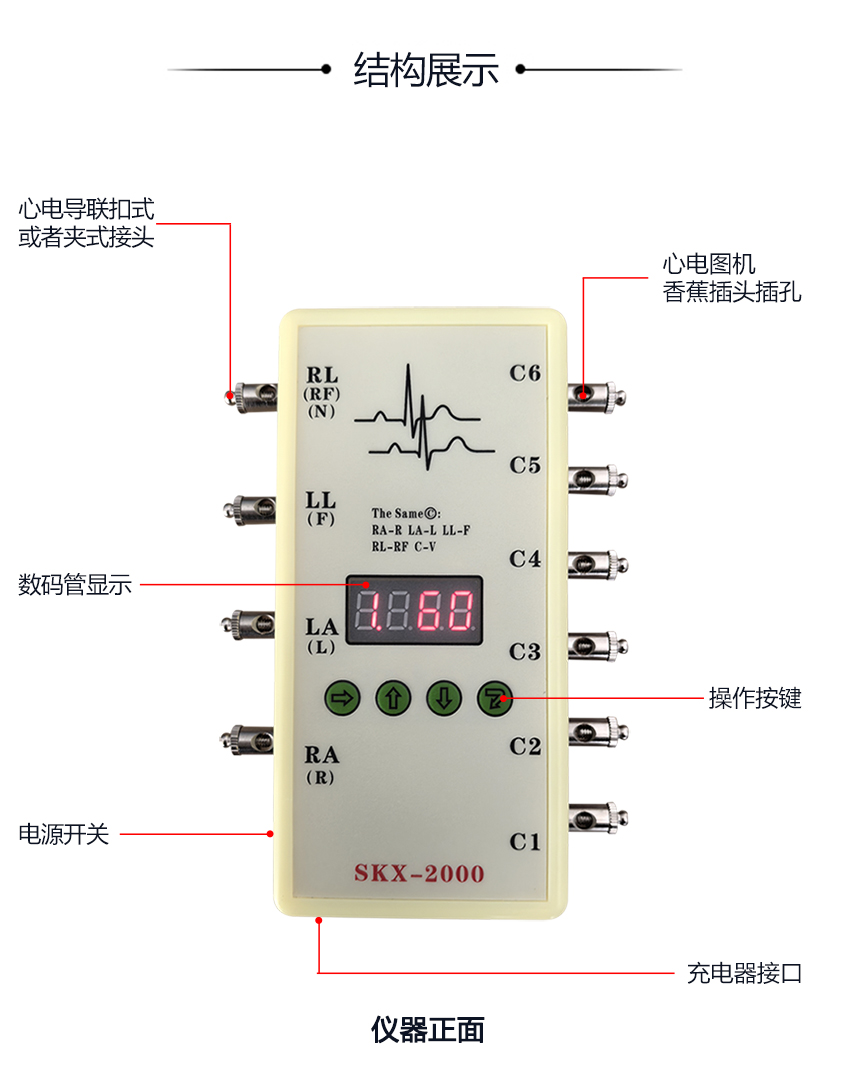
③ 心電圖機接法:RA-R(右手),LA-L(左手), LL-F(左腿), ③ Electrocardiograph connection method: RA - R (right hand), LA - L (left hand), LL - F (left leg),
RL-RF(右腿),C1-C6胸導 RL - RF (right leg), C1 - C6 chest leads
④ 監護儀接法:RA-右手(白色),LA-左手(黑色),LL-左腳(紅色), ④ Connection method of the monitor: RA - right hand (white), LA - left hand (black), LL - left foot (red),
RL-右腳(綠色),C1-C6胸導(棕色) RL - right foot (green), C1 - C6 chest leads (brown)
⑤ 三導聯接法:RA-右手(白色),LA-左手(黑色),LL-左腳(紅色) ⑤ Three-lead connection method: RA - right hand (white), LA - left hand (black), LL - left foot (red)
⑥ 歐標對應接法:L-LA R-RA RF(N)-RL F-LL C-V ⑥ European standard corresponding connection methods: L-LA, R-RA, RF(N)-RL, F-LL, C-V
按鍵說明 Key Press Instructions
一共有四個按鍵,依次為選擇鍵、增加鍵、減小鍵、確認鍵, There are a total of four buttons, namely the selection button, the increase button, the decrease button, and the
另外還有一組組合鍵。 confirmation button. Additionally, there is a set of combination keys.
選擇鍵 Selection key
此按鍵用來選擇要改變的參數,共有4個LED管來顯示4個代碼, This button is used to select the parameter to be changed. There are four LED tubes to display four codes.
分別代表顯示的內容, 1代表波形代碼,2-4代表要更改的參數 Represent the displayed content respectively.1 represents waveform code.2-4 indicates the parameter to be changed
(2是數值的百位,3代表十位,4代表個位), (2 represents the hundreds place of the number, 3 represents the tens place, and 4 represents the units place).
LED管右下腳的亮點,表示現在選擇的內容;可以進行更改。 The bright spot on the lower right corner of the LED tube indicates the currently selected content; it can be changed.
增加鍵 Selection key
當使用選擇鍵選擇好更改內容后,使用此鍵進行參數更改。 After selecting the changes you want to make using the selection key, use this key to make the parameter adjustments.
減小鍵 Reduce button
當使用選擇鍵選擇好更改內容后,使用此鍵進行參數更改。 After selecting the changes you want to make using the selection key, use this key to make the parameter adjustments.
確認鍵 Confirm button
當參數更改完畢后,此鍵確認后將確認參數的更改,并產生相應的波形。 After the parameters are changed, pressing this key will confirm the changes and generate the corresponding waveform.
組合鍵 Combination key
按下選擇鍵的同時,再按下確認鍵,松開確認鍵,松開選擇鍵, While pressing the selection key, then press the confirm key, release the confirm key, and release the selection key.
這時表示選擇了一次組合鍵,再次按下確認鍵后將顯示不同的內容。 At this point, it indicates that a combination key has been selected. After pressing the confirmation key again, different content will be displayed.
SKX-2000C 心電信號模擬儀器使用說明
功能特點:
★ 10個萬用連接頭,可以連接任意心電類產品。
★ 12導聯同步心電信號輸出,輸出不同的12導心電波形。
★ 內置高性能CPU,可以模擬輸出標準心率為60bpm的心電波形。
★ 內置大容量鋰電池,外置專用充電器。
★ 系統具有自動休眠功能,電池過沖、過放保護功能。
★ 數碼管顯示波形代碼,及頻率、幅度等參數內容。
★ 按鍵操作,更改波形種類、波形頻率、幅度等參數。
本模擬器可以產生如下波形,第一位代碼代表如下波形
1. 采集人體正常的心電波形
2. 標準心率波形(尖角波),用于檢測心率范圍
8. 設置波形幅度參數
波形參數介紹:
1. 正常心電波形
★ 心率設置范圍:10bpm-200bpm;(初始數值:60 bpm)
★ 信號幅度固定。
2. 正負三角波形
★ 頻率范圍:10bpm-400bpm;(初始數值:75 bpm)
★ 幅度范圍:0.1mV-4mV(10:0.1mV ,400:4mV);
★ 2種模式,模式一:正向波形,模式二:負向波形;通過組合鍵進行選擇。
8. 信號幅度設置
★ 幅度范圍:0.1mV-4mV(10:0.1mV ,400:4mV);(初始數值:100)
★ 請注意,此幅度設置將影響到除正常心電波形外的所有波形。
注意:
① 本模擬器上電后自動產生波形1的正常心電波形。
② 模擬器的LED顯示管,為防止用戶在使用過程中忘記關閉電源,系統設計為當24小時內沒有操作按鍵時,CPU將進入待機狀態,以便節電,再次開機
將正常工作。按任意按鍵則計時歸零。
③ 心電圖機接法:RA-R(右手),LA-L(左手),LL-F(左腿),RL-RF(右腿),C1-C6胸導
④ 監護儀接法:RA-右手(白色),LA-左手(黑色),LL-左腳(紅色),RL-右腳(綠色),C1-C6胸導(棕色)
⑤ 三導聯接法:RA-右手(白色),LA-左手(黑色),LL-左腳(紅色)
⑥ 歐標對應接法:L-LA R-RA RF(N)-RL F-LL C-V
按鍵說明
一共有四個按鍵,依次為選擇鍵、增加鍵、減小鍵、確認鍵,另外還有一組組合鍵
選擇鍵
此按鍵用來選擇要改變的參數,共有4個LED管來顯示4個代碼,分別代表顯示的內容,
1代表波形代碼,2-4代表要更改的參數(2是數值的百位,3代表十位,4代表個位)
LED管右下腳的亮點,表示現在選擇的內容;可以進行更改。
增加鍵
當使用選擇鍵選擇好更改內容后,使用此鍵進行參數更改。
減小鍵
當使用選擇鍵選擇好更改內容后,使用此鍵進行參數更改。
確認鍵
當參數更改完畢后,此鍵確認后將確認參數的更改,并產生相應的波形。
組合鍵
按下選擇鍵的同時,再按下確認鍵,松開確認鍵,松開選擇鍵,這時表示選擇了一次組合鍵,再次按下確認鍵后將顯示不同的內容。